Official Contact Channels Without Using Private Data
Table of Contents
- Official Channels to Contact a Person or Company Without Using Private Data
- Why Privacy-Safe Outreach Through Official Contact Channels Is Safer
- Start With the Official Contact Page and Business Support Portal
- Use a Public Role Address or Official Business Registry
- Contact a Company Through Official Channels or a Verified Social Account
- Verify Official Contact Details and Avoid Phishing
- Escalate Through Company Official Channels Without Using Private Data
- Use AI for Routing, Not Private-Data Hunting
- Common Mistakes and Practical Answers
- Final Thoughts
- Official Channels to Contact a Person or Company Without Using Private Data
- Why Privacy-Safe Outreach Through Official Contact Channels Is Safer
- Start With the Official Contact Page and Business Support Portal
- Use a Public Role Address or Official Business Registry
- Contact a Company Through Official Channels or a Verified Social Account
- Verify Official Contact Details and Avoid Phishing
- Escalate Through Company Official Channels Without Using Private Data
- Use AI for Routing, Not Private-Data Hunting
- Common Mistakes and Practical Answers
- Final Thoughts
Official Channels to Contact a Person or Company Without Using Private Data
The safest way to reach someone is through official channels without using private data. An official contact page, business support portal, public role address, company registry, or verified social account can route your message without exposing anyone’s home address, personal phone number, or private email.
This protects privacy and security. Fraud often begins when someone trusts contact details copied from an unexpected message or an unverified directory. Find official channels to contact a person or company without using private data, verify them, and document the exchange.
TL;DR: Use verified, organization-approved contact routes. This guide covers:
- Finding and verifying official contact routes
- Choosing the right channel for the request
- Avoiding phishing, doxxing, and private-data brokers
- Escalating when the first contact attempt fails
- Using AI without feeding sensitive data into an unsafe workflow
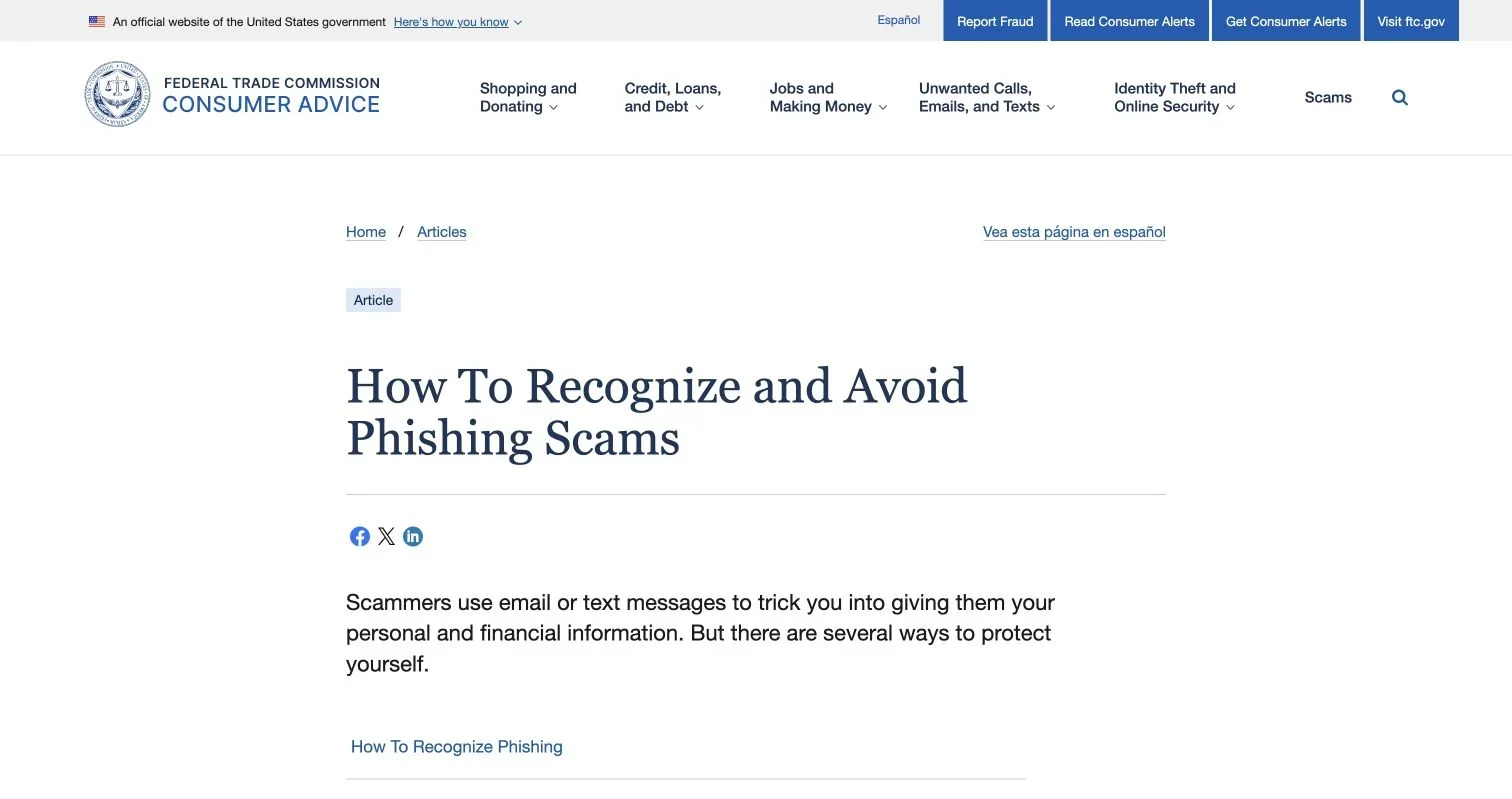
Source page reviewed in Chrome during article research. Follow the image link for the current page.
Why Privacy-Safe Outreach Through Official Contact Channels Is Safer
Official contact channels are controlled or publicly endorsed by the person or organization you want to reach. Responses may not be fast, but you can check the route against an authoritative source without relying on data collected without consent.
The FTC reported that people lost about $16 billion to fraud in 2025, roughly 25% more than in 2024. Reported losses to imposter scams alone reached $3.5 billion. Email, text, and phone impersonation succeeds because messages often look ordinary, so verify contact details before replying or sending money. See the FTC’s 2025 fraud findings.
| Contact method | Privacy risk | Verification strength | Best use |
|---|---|---|---|
| Official website form | Low | High when opened from the known domain | General questions and sales inquiries |
| Authenticated support portal | Low | Very high | Account, billing, or technical support |
| Published role address | Low | High when shown on the official site | Legal, privacy, security, or media matters |
| Verified social account | Medium | Moderate | Asking where to send a formal request |
| Personal-data broker listing | High | Low | Avoid |
Official channels create a reliable audit trail: ticket numbers, confirmation emails, and portal histories are easier to review than calls to an unverified number.
Start With the Official Contact Page and Business Support Portal
Begin with the organization’s known website and official contact page. Type the domain, use a bookmark, or find it in a trusted document such as a signed contract or invoice. Do not use a link from a suspicious message.
Use this sequence:
-
Confirm the domain spelling. Watch for extra words, substituted letters, unusual subdomains, and unexpected country-code endings.
-
Look for pages labeled Contact, Help, Support, Customer Service, About, Legal, Privacy, Security, Press, or Investor Relations.
-
Choose the channel that matches the request. A billing ticket should not go to the media team, and a vulnerability report should not be pasted into a public chat widget.
-
Sign in through the normal account page if the matter concerns an existing account. An authenticated business support portal lets the company identify you without asking for excess personal data.
-
Save the ticket number, submission time, page URL, and confirmation message.
A small business disputing a software invoice should open the vendor’s website from its password manager and create a billing ticket. That is safer than calling the number printed in an unexpected payment reminder. It also leaves evidence for finance and compliance teams.
Before submitting, check:
| Item | What to check | Why it matters |
|---|---|---|
| Domain | Exact company domain and HTTPS connection | Reduces spoofing risk |
| Form purpose | Department and issue category | Improves routing |
| Requested fields | Only information needed for the case | Limits data exposure |
| Confirmation | Ticket number or email receipt | Supports follow-up |
Use a Public Role Address or Official Business Registry
You may need to reach a person without their private contact details. A public role address reaches a function rather than an individual. Common examples include support@, billing@, privacy@, security@, legal@, press@, and investor-relations addresses published on an official domain.
Role addresses may remain active through staffing changes and feed a managed queue with access controls and response targets.
Useful public sources include:
- A company’s official leadership, newsroom, governance, or legal page
- A state Secretary of State business registry in the United States
- The SEC EDGAR database for public-company filings
- A professional regulator’s public directory when the role is licensed
- A government agency directory for public officials and public offices
Use registries only for their stated business purpose. A registered agent or corporate address may be suitable for formal notices, but it is rarely the best place for routine customer support. Never treat a filing as permission to investigate an officer’s family, residence, or personal accounts.
A shareholder trying to reach a public company’s chief financial officer should use the investor-relations address on the corporate site or in an SEC filing, where the team can route the question. Searching for the executive’s personal number adds privacy risk without improving the request.
Contact a Company Through Official Channels or a Verified Social Account
A verified social account can help when the official contact page is unavailable or the correct department is unclear. Treat social media as a routing layer, not as the place to disclose the full problem.
Verification badges alone are insufficient. Account verification systems differ by platform and can change. Cross-check the account against the organization’s website.
Before sending a message, confirm:
- The social profile is linked from the official company domain
- The handle, spelling, history, and website link are consistent
- The account is active and posts material that matches the organization
- The profile does not ask users to move immediately to an unrelated messaging app
- The conversation does not require passwords, payment details, health information, or identity documents
In a brief public message, name the issue type and ask for the official intake route. Move to the company’s portal once the account supplies a link that you independently verify.
Press and investor contacts are official channels for narrow audiences. A journalist seeking comment should use the newsroom address. An investor should use investor relations. A customer asking for a refund should stay with support unless normal escalation has failed and the issue has wider public or regulatory relevance.
Posting publicly may prompt a faster reply but can expose account details and attract fake support agents. Never include an order number, email address, phone number, travel plan, medical fact, or screenshot containing personal data in a public post.
Verify Official Contact Details and Avoid Phishing
An official-looking message does not prove the channel is official. Sender names, logos, caller ID, and social profiles can be copied. When asked to act, contact the organization through a trusted route.
The FTC’s phishing guidance gives a plain rule: if you may have an account with the company, contact it using a phone number or website you know is real, not the information in the email. The FTC also warns that links and attachments may install malware.
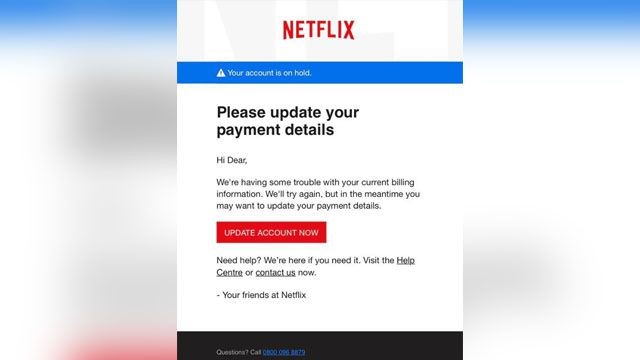
Source screenshot: the FTC’s example of a phishing email that imitates a familiar company.
Pause when a message contains any of these signs:
- An urgent threat involving account closure, arrest, or immediate payment
- A request to confirm passwords, card numbers, or Social Security numbers
- An invoice or attachment you did not expect
- A payment request using cryptocurrency, gift cards, or an unfamiliar bank account
- A link whose destination does not match the visible company name
If an accounts-payable employee receives an email saying a supplier changed banks, they should not reply or use the signature number. They should call the supplier through the number in the approved vendor record and require a second verification under the company’s payment-change policy. Separating the request from verification can stop business email compromise.
Escalate Through Company Official Channels Without Using Private Data
A slow reply does not justify using a private phone number. Escalation should be measured, documented, and follow the organization’s published structure.
Use this escalation ladder:
-
Submit through the primary official channel and save the confirmation.
-
Follow up in the same ticket after the published response time has passed. Keeping one thread reduces duplicate work.
-
Ask for a supervisor, case manager, or department transfer. State the requested outcome in one sentence.
-
Move to a specialized public address when the subject requires it, such as privacy, accessibility, security, legal notices, press, or investor relations.
-
Use an external authority when appropriate. Options may include a regulator, consumer-protection office, ombuds service, professional licensing body, or court-approved notice process.
A patient awaiting a medical-record request should contact the provider’s medical-records or privacy office and avoid posting health details on social media. In the United States, unresolved HIPAA access concerns may be directed to the HHS Office for Civil Rights.
Keep the escalation record compact:
| Record | What to save | Purpose |
|---|---|---|
| Initial contact | Date, channel, summary, ticket number | Proves the request was submitted |
| Follow-up | Response deadline and reply | Shows reasonable effort |
| Evidence | Contract section, invoice, or policy link | Keeps the issue factual |
| Requested result | Refund, correction, access, or callback | Makes resolution easier |
Do not threaten employees, contact relatives, publish personal details, or coordinate harassment. That is abuse, not escalation.
Use AI for Routing, Not Private-Data Hunting
AI can streamline privacy-safe outreach. It can classify requests, suggest departments, summarize ticket histories, translate messages, or draft follow-ups. Do not use it to infer home addresses, personal emails, family relationships, or hidden social accounts.
A privacy-respecting AI workflow:
-
Collect contact options only from approved public sources, such as the official website, authenticated portal, registry, or regulator directory.
-
Remove unnecessary personal and confidential data before sending text to an AI service.
-
Ask the model to classify the issue and draft a message, not to invent missing contact information.
-
Require a human to confirm the domain, address, recipient, and attachments before sending.
-
Log the source URL and date for every contact route used.
Regulated organizations must align tools and workflows with applicable contracts and controls. A healthcare team should not place protected health information into an unapproved model. A company working under GDPR should follow data-minimization and purpose-limitation rules. SOC 2 and ISO 27001 programs will usually call for access control, vendor review, retention rules, and audit logs. FedRAMP work may require an authorized service and stricter data boundaries.
AI can invent plausible addresses. Treat any AI-suggested address as unverified until an authoritative public source confirms it.
Common Mistakes and Practical Answers
Outreach often fails when people prioritize speed over verification and bypass official channels. Private-data brokers compile phone numbers, addresses, relatives, and possible emails, but their data may be outdated, misattributed, or collected for unrelated purposes. Do not use them to bypass an organization’s published process.
| Mistake | Better approach | Why it works |
|---|---|---|
| Replying to an unexpected message | Open the known website independently | Breaks the phishing path |
| Guessing an employee’s email | Use a published role address | Respects privacy and improves routing |
| Sending the same request everywhere | Keep one ticket and escalate in order | Prevents conflicting case records |
| Posting evidence publicly | Upload through an approved portal | Limits exposure |
| Trusting an AI-generated contact | Verify it on an authoritative source | Prevents hallucinated routing |
| Buying personal contact data | Use company, registry, or regulator channels | Avoids doxxing and stale records |
Common questions:
Final Thoughts
The best official channels are usually visible: an official contact page, support portal, public role address, public filing, verified social account, or regulator directory. Confirm the domain, disclose only what the recipient needs, and keep a record.
Remember:
- Separate an incoming request from the channel used to verify it
- Prefer role-based and authenticated contact routes
- Escalate through published departments and public authorities
- Keep personal data out of public posts and unapproved AI tools
- Reject doxxing, guessed addresses, and private-data brokers
This approach takes longer than replying immediately but provides privacy, better records, and less risk of giving information or money to an impostor.
Frequently Asked Questions
Can I guess a corporate email pattern?
No. A guessed address may reach the wrong person or expose sensitive content. Use a published address or ask the switchboard to route you.
Can I call a number shown in an email signature?
Only after checking it against a known website, contract, account portal, or approved vendor record.
What if no contact page exists?
Check a government business registry, regulatory directory, public filing, or the organization’s verified social profile for a routing request.
Should I send identity documents by email?
Only when the organization confirms the requirement and provides an approved secure method. Redact fields it does not need.
When is public outreach reasonable?
Use it to request a contact route or note an unresolved case, while keeping private facts out of the post.
How can I confirm that a contact channel is legitimate?
Open the organization’s known website independently and verify that it publishes or links to the contact method. Check the domain spelling, page purpose, and HTTPS connection rather than trusting names, logos, caller ID, or links in unexpected messages.
Which official channel should I use for my request?
Choose the channel that matches the issue, such as an authenticated portal for account support, billing@ for invoices, or privacy@ for data requests. Correct routing usually produces a faster response and reduces unnecessary disclosure.
What should I do if the organization has no contact page?
Check an official business registry, regulator directory, government listing, or public filing for an appropriate business contact. A social account linked from the organization’s official domain can also help identify the correct intake route, but avoid sharing case details there.
How should I respond to an unexpected payment or account message?
Do not reply, open attachments, or use the contact information supplied in the message. Instead, access the company through a trusted bookmark, authenticated portal, approved vendor record, or independently verified phone number.
What information is safe to include in an initial request?
Provide only what is necessary to identify the issue and route it correctly. Keep passwords, full payment details, identity documents, health information, and other sensitive data out of email and public posts unless an approved secure process specifically requires them.
How can I escalate when an official channel does not respond?
Follow up within the original ticket after the published response period, then request a supervisor or transfer to the appropriate specialist department. If internal escalation fails, consider a relevant regulator, ombuds service, licensing body, or formal notice process while preserving your records.
Can AI help me find or contact the right department?
AI can classify your issue, suggest likely departments, and draft a concise message, but it should not be used to find private contact details. Verify every suggested address against an authoritative source, remove unnecessary sensitive information, and have a person review the recipient and attachments before sending.