MacBook Air M4 Thermal Throttling for Local LLMs
Table of Contents
- MacBook Air M4 Thermal Throttling: What to Expect
- Why Fanless Cooling Changes MacBook Air M4 Sustained LLM Inference
- Why Short M4 MacBook Air LLM Performance Benchmarks Can Mislead
- Memory, Bandwidth, and Model Fit for a MacBook Air M4 Local LLM
- Reproducible MacBook Air M4 Thermal Throttling Sustained LLM Inference Test
- Optimizing M4 MacBook Air LLM Performance
- MacBook Air vs Pro Local AI Performance
- Practical MacBook Air vs Pro Local AI Scenarios and Pitfalls
- Final Thoughts
- MacBook Air M4 Thermal Throttling: What to Expect
- Why Fanless Cooling Changes MacBook Air M4 Sustained LLM Inference
- Why Short M4 MacBook Air LLM Performance Benchmarks Can Mislead
- Memory, Bandwidth, and Model Fit for a MacBook Air M4 Local LLM
- Reproducible MacBook Air M4 Thermal Throttling Sustained LLM Inference Test
- Optimizing M4 MacBook Air LLM Performance
- MacBook Air vs Pro Local AI Performance
- Practical MacBook Air vs Pro Local AI Scenarios and Pitfalls
- Final Thoughts
MacBook Air M4 Thermal Throttling: What to Expect
TL;DR: A MacBook Air M4 local LLM can run well, though sustained inference may slow as its fanless chassis heats. Unified memory lets the CPU and GPU share model data, while the fanless design stays silent. That combination is appealing for private document analysis, coding help, and offline customer-support tools.
A quick demonstration does not show how the laptop behaves after an hour of continuous inference, when accumulated heat may force it to reduce power and clock speed. This guide explains how to measure MacBook Air M4 thermal throttling sustained LLM inference without claiming a universal result.
You will learn how to evaluate:
- Short-burst and sustained generation speed
- Model size, quantization, and memory pressure
- Thermal buildup and battery settings
- MacBook Air vs Pro local AI performance
- Practical business and development workloads
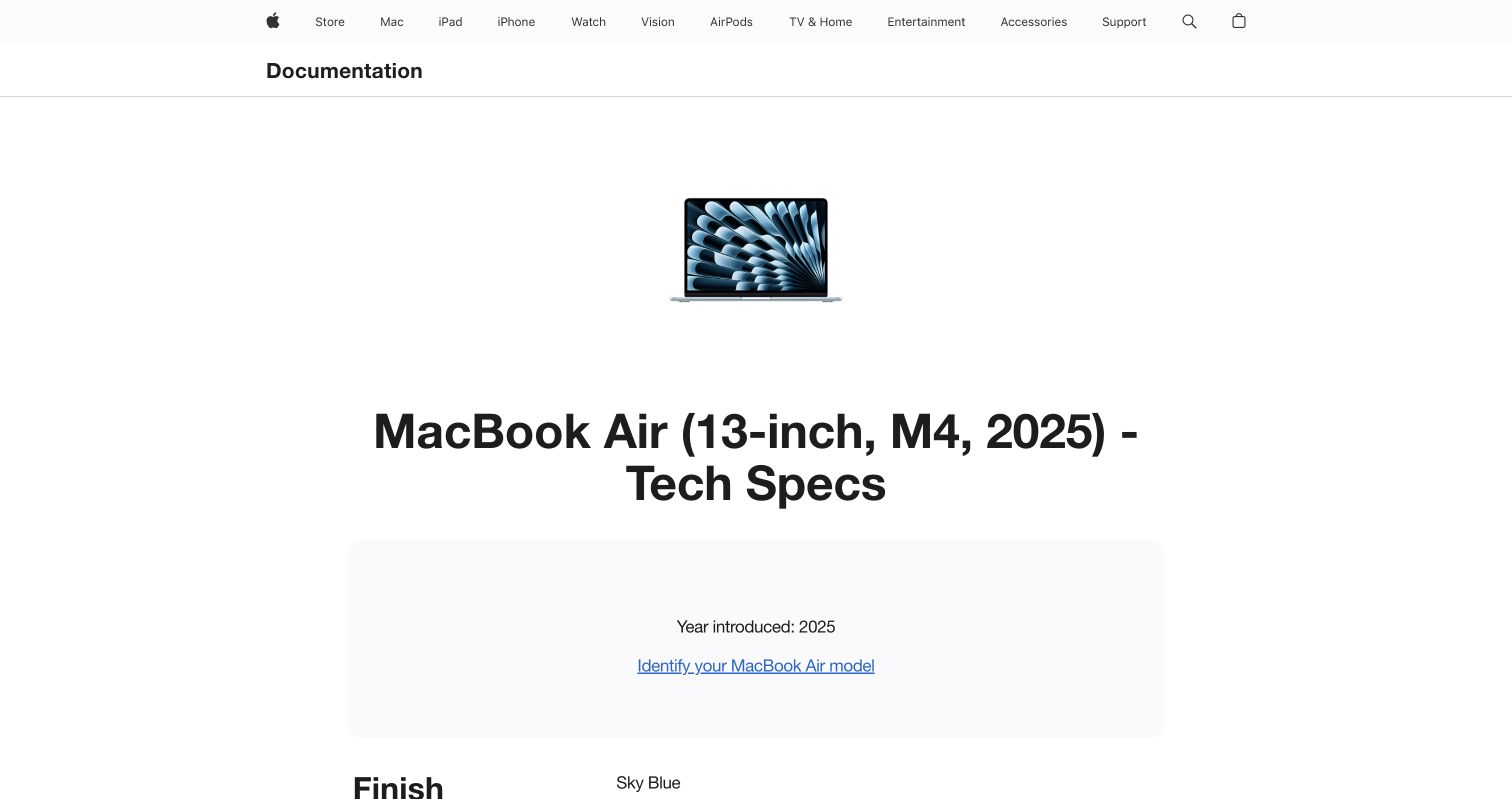
Screenshot: Apple’s MacBook Air 13-inch M4 technical specifications, captured July 2026. Check the specification page for the exact model and configuration being tested.
Why Fanless Cooling Changes MacBook Air M4 Sustained LLM Inference
The MacBook Air has no cooling fan. Heat moves from the M4 chip through the chassis into the air. The aluminum enclosure absorbs enough heat for light work and short bursts. Continuous GPU inference eventually uses up that thermal buffer.
macOS can then lower the chip’s power, causing protective MacBook Air M4 thermal throttling. The laptop keeps working, but output may slow.
Third-party reports do not agree on one throttle point. asiai reports throttling after roughly 5 to 10 minutes in its testing guidance, while ModelFit discusses reductions after longer intensive sessions and labels its published speed figures as estimates. Room temperature, model, context length, inference engine, chassis size, and background activity can alter the result. Treat any fixed minute count as a test observation, not a specification.
| Workload pattern | Likely thermal behavior | What the user notices |
|---|---|---|
| One short question | Chassis absorbs the heat | Fast response and little delay |
| Repeated document summaries | Temperature rises across requests | Later answers may generate more slowly |
| Continuous agent or batch job | System reaches thermal equilibrium | Sustained throughput may settle below its initial rate |
| Workload with long idle gaps | Laptop cools between requests | Performance can recover before the next burst |
A MacBook Air M4 local LLM can therefore feel fast in chat but slow during an overnight workflow.
Why Short M4 MacBook Air LLM Performance Benchmarks Can Mislead
A one-minute benchmark often captures peak M4 MacBook Air LLM performance on a cool laptop but says little about a 60-minute coding agent or support-ticket queue.
Long inference creates thermal buildup. The chip, heat spreader, enclosure, keyboard, and nearby air gradually warm. Generation speed may fall quickly, drift down in stages, or remain stable with a smaller model. A useful test records a time series, not one average.
Measure four metrics separately:
- Prompt processing speed: how quickly the engine reads input tokens.
- Time to first token (TTFT): the delay before the first generated token appears.
- Generation speed: output tokens produced per second.
- Sustained speed: generation throughput after temperature and power have stabilized.
The open-source llama.cpp benchmark tool reports average tokens per second and standard deviation. Its server also separates prompt throughput from predicted-token throughput. A system can read a short prompt quickly yet generate a long answer slowly.
Use this simple comparison after each test:
Sustained retention (%) = final 10-minute average tok/s ÷ initial 5-minute average tok/s × 100
A 75% retention result means the settled rate was one-quarter below the cool-start rate; this example does not apply to every MacBook Air.
Memory, Bandwidth, and Model Fit for a MacBook Air M4 Local LLM
Apple lists 120GB/s memory bandwidth for the M4 MacBook Air. The 2025 model starts with 16GB of unified memory and can be configured with 24GB or 32GB, according to Apple’s technical specifications. Unified memory is shared by macOS, applications, the inference engine, model weights, and the model’s key-value cache.
Capacity and bandwidth measure different constraints:
| Resource | Question it answers | Typical symptom when constrained |
|---|---|---|
| Unified-memory capacity | Can the model and context fit? | Memory pressure, compression, swapping, or failure to load |
| Memory bandwidth | How quickly can weights be read during generation? | Lower tokens per second, especially with larger models |
| Thermal capacity | Can the chip sustain its power level? | Throughput falls as the machine heats |
| SSD capacity | Can model files be stored locally? | Downloads fail or the model library crowds business files |
Quantization stores model weights with fewer bits. A 4-bit model generally needs far less memory than a 16-bit version, though sizes depend on architecture and engine. Lower precision may also reduce response quality on some tasks. A model that fits on disk may not fit comfortably in memory.
Leave headroom for the operating system and work applications. A model that nearly fills a 16GB machine may force you to close browsers, development tools, or document systems. Longer context also expands the key-value cache. On a business laptop, stable multitasking often matters more than barely loading the largest model.
Reproducible MacBook Air M4 Thermal Throttling Sustained LLM Inference Test
This reproducible MacBook Air M4 thermal throttling sustained LLM inference test produces evidence for your configuration rather than reporting benchmark numbers. Use the same model, prompt, engine version, and settings on every machine.
-
Record the Mac model, GPU-core count, unified memory, macOS version, room temperature, power source, charger, and Low Power Mode status.
-
Choose one fixed model, such as a 7B-to-9B instruct model in a common 4-bit format. Record the exact filename, checksum, quantization, context limit, and inference engine commit or version.
-
Prepare a fixed short prompt for generation testing and a long document for prompt-processing tests. Set a fixed output target, such as 1,000 tokens, and use a deterministic seed or temperature of zero where supported.
-
For a cool start, stop heavy jobs, place the laptop on a hard desk, and let activity and temperature settle. Do not cool one machine with an external fan unless every machine receives the same treatment.
-
Run continuous inference for 60 minutes. Repeat the same generation request with minimal delay. Log generation tok/s, prompt tok/s, TTFT, memory pressure, power, battery percentage, and thermal status at least once per minute.
-
Repeat the test three times, separating plugged-in and battery runs. Randomize the test order when comparing engines so that one engine does not always receive the coolest start.
| Test control | What to keep constant | Why it matters |
|---|---|---|
| Model | Exact weights and quantization | Different files change memory traffic and quality |
| Context | Same token count and cache settings | Larger caches consume more unified memory |
| Output | Same requested token count | Short answers may end before thermal buildup |
| Software | Same engine and version | Backends can use Apple Silicon differently |
| Environment | Same desk and similar room temperature | Airflow and ambient heat affect passive cooling |
| Power | Separate plugged-in and battery runs | macOS power policy may change performance |
Report the initial five-minute average, the final ten-minute average, the lowest five-minute window, and run-to-run variation. asiai’s benchmarking guide uses tokens per second, TTFT, power, efficiency, memory, stability, and thermal state, which is a sound reporting framework.
Optimizing M4 MacBook Air LLM Performance
A smaller model that answers the business question usually offers more speed, memory headroom, and thermal margin.
Apply changes one at a time and repeat the same benchmark:
- Select a 4-bit or 5-bit quantization that passes your quality tests.
- Limit context to what the task actually needs instead of setting the maximum available window.
- Close memory-heavy browsers, containers, video calls, and creative applications before a long run.
- Put the laptop on a hard, open surface. Fabric and enclosed stands can restrict heat loss.
- Test MLX-native and llama.cpp-based engines with identical model quality settings.
- Batch offline work when latency is unimportant, but insert pauses if consistent interactive speed matters more than total completion time.
- Keep macOS and the inference engine version fixed during a formal comparison.
Control battery tests separately. Apple lists a 53.8Wh battery for the 13-inch M4 Air, but its advertised web and video runtimes do not predict continuous LLM inference. Sustained GPU use differs. Record energy use instead of converting Apple’s battery claim into an AI-runtime estimate.
When plugged in, use an adequate Apple or standards-compliant adapter and record its rating. Check whether Low Power Mode is enabled under the relevant battery or power-adapter profile. Turning it off may improve performance, but it can raise heat and energy use. Maximum tok/s is not always the right target; mobile teams may value tokens per watt and predictable battery drain more.
MacBook Air vs Pro Local AI Performance
The standard M4 MacBook Air and 14-inch M4 MacBook Pro both have 120GB/s memory bandwidth in Apple’s published specifications. The main sustained-workload difference is cooling: the Pro uses fans; the Air is fanless. The Pro also has a larger battery and more ports, though configuration and current pricing should be checked at purchase time.
Author’s note — Eugene Mi: It is important to note that the 14-inch MacBook Pro with a standard M4 or M5 chip has just one fan. Two fans are included with M4 Pro or M5 Pro configurations, as well as the higher-tier Max configurations.
| Requirement | Better starting choice | Reason |
|---|---|---|
| Private chat and short document summaries | MacBook Air M4, 16GB or 24GB | Quiet, portable, and capable when jobs have cooling gaps |
| Repeated 7B-to-9B inference with normal office apps open | MacBook Air M4, 24GB or 32GB | More memory headroom reduces pressure and swapping |
| Continuous coding agents or batch processing | MacBook Pro | Active cooling is better suited to sustained load |
| Larger models, long contexts, or concurrent AI tools | MacBook Pro with more memory | Capacity may become the limit before temperature does |
| Fixed desk deployment running all day | Mac mini, Mac Studio, or server | A stationary actively cooled system may offer better operational fit |
A MacBook Pro is better when settled throughput affects deadlines or staffing. For a support team processing a four-hour nightly queue, a modest slowdown compounds across tickets. The Pro’s higher price may cost less than delays, managed pauses, or moving unfinished jobs to the cloud.
Developers who alternate local-model questions with reading and editing create natural cooling gaps. Then, the Air’s silence and lower weight may matter more than sustained speed.
Practical MacBook Air vs Pro Local AI Scenarios and Pitfalls
Consider four cases before buying:
- Compliance document review: A consultant summarizes one policy at a time. A 24GB or 32GB Air may be comfortable because human review creates idle periods. Local processing can reduce data exposure, but it does not by itself create HIPAA, SOC 2, ISO 27001, GDPR, or FedRAMP compliance.
- Helpdesk drafting: An employee generates replies interactively during business hours. Measure TTFT and final answer latency rather than maximum batch throughput.
- Software development agent: An autonomous tool reads repositories and generates code continuously. Thermal buildup, context growth, and long-running throughput make a MacBook Pro more attractive.
- Nightly ticket classification: Hundreds of requests run without pauses. Test the full queue or a representative 60-minute segment; a short chat benchmark is the wrong purchasing metric.
Common mistakes include comparing quantizations, mixing plugged-in and battery tests, and reporting only the fastest run. Local inference does not automatically protect sensitive data. Teams still need access controls, disk encryption, retention rules, approved model licenses, audit logs, and a process for checking generated output.
webAI describes local processing as a way to reduce cloud exposure and infrastructure dependence. That benefit does not exempt local AI from the security and compliance program governing other business systems.
Final Thoughts
The MacBook Air M4 handles local AI well, especially interactive work with natural pauses. Its fanless enclosure cannot remove sustained heat as predictably as an actively cooled MacBook Pro.
Do not buy from a one-minute benchmark or an unsupported tokens-per-second claim. Run a controlled MacBook Air M4 thermal throttling sustained LLM inference test, record the cool-start and settled rates, and include memory pressure, TTFT, power, and workload completion time.
Choose the Air for portability, silence, and short sessions; choose a MacBook Pro or desktop Mac for continuous inference, more memory, or predictable throughput. The right machine sustains your workload, not the shortest demo.
Frequently Asked Questions
How can I tell whether heat or memory pressure is causing the slowdown?
Thermal throttling usually appears as declining throughput during a sustained run, even when the model and context remain unchanged. Memory pressure is more likely to cause swapping, unusually long delays, or failure to load the model. Monitor both thermal status and memory usage to separate the two causes.
How long should I test a local LLM before buying a MacBook Air M4?
Run your actual workload continuously for at least 60 minutes, because a short test mainly reflects cool-start performance. Repeat the test several times under comparable room, power, and software conditions. For overnight or high-volume jobs, also test a representative queue from beginning to end.
Which benchmark results matter most for interactive use?
Prioritize time to first token and sustained generation speed, since these determine how responsive the system feels. Prompt-processing speed also matters when working with long documents or large codebases. Peak tokens per second alone can hide slower performance after the laptop heats up.
Can reducing context length improve sustained performance?
Yes, a shorter context reduces the memory required for the key-value cache and may ease overall memory pressure. It can also improve prompt-processing time, especially when requests repeatedly include large documents. Set the context window to the practical needs of the task rather than the engine’s maximum.
Should sustained LLM tests be run on battery or while plugged in?
Test both modes separately because macOS may apply different power policies to each. Keep the charger, Low Power Mode setting, and battery state consistent when comparing results. Battery tests should track energy use and workload completion rather than relying on Apple’s web-browsing runtime estimates.
When is a MacBook Pro worth choosing over a MacBook Air?
A MacBook Pro is the stronger choice when inference runs continuously and predictable throughput affects deadlines or operating costs. Its active cooling is better suited to coding agents, batch processing, and long support queues. The Air remains attractive for portable, silent, interactive work with natural cooling breaks.
What should a team document to make benchmark results reproducible?
Record the exact model file, quantization, checksum, inference engine version, context size, output length, and generation settings. Also note the Mac configuration, macOS version, ambient temperature, power mode, and background applications. Report both cool-start and settled performance instead of publishing only the fastest run.
Does MacBook Air M4 Thermal Throttling Affect Every Local LLM?
The fanless design limits sustained heat removal, but the effect depends on workload and environment. A small model with pauses may never show a meaningful slowdown. A continuous GPU-heavy job will more likely settle below its cool-start rate. Measure your own configuration before drawing a firm conclusion.
Is 16GB enough for a MacBook Air M4 local LLM?
It can support smaller quantized models if you leave room for macOS and other applications. Choose 24GB or 32GB if you need larger models, longer contexts, or normal office multitasking. Memory cannot be upgraded after purchase.
How many tokens per second is good?
There is no universal target. Interactive chat needs tolerable TTFT and reading-speed generation; batch work needs jobs completed per hour. Record both prompt processing and generation, then compare the final sustained rate with your service target.
Will a cooling pad prevent throttling?
It may change chassis heat transfer, depending on its design and room conditions; test it as another variable. A cooling accessory does not turn passive cooling into the controlled active-cooling system found in a MacBook Pro.
Should I benchmark Ollama, LM Studio, MLX, or llama.cpp?
Test the engines your team can support. Engine choice can change speed, memory use, model availability, logging, and deployment work. Keep the model and quantization equivalent for a fair comparison.
Is local AI automatically private and compliant?
No. Avoiding a third-party API removes one exposure path, but files, caches, outputs, logs, backups, and user access still need controls. Compliance depends on the whole workflow, not the location of inference alone.