
PCI DSS for Support Teams: Card Numbers in Tickets
Table of Contents
- Why credit card numbers end up in support tickets
- What PCI DSS 4.0.1 says about card data in support channels
- What to do when a customer sends a card number in a ticket
- Turn on card data redaction in your helpdesk
- Take payments without touching the card number
- Phone support and call recordings
- AI chatbots, transcripts and PCI compliance for helpdesk tools
- Write a one-page PCI DSS policy for your support team
- Common mistakes to avoid
- Final thoughts
- Why credit card numbers end up in support tickets
- What PCI DSS 4.0.1 says about card data in support channels
- What to do when a customer sends a card number in a ticket
- Turn on card data redaction in your helpdesk
- Take payments without touching the card number
- Phone support and call recordings
- AI chatbots, transcripts and PCI compliance for helpdesk tools
- Write a one-page PCI DSS policy for your support team
- Common mistakes to avoid
- Final thoughts
Why credit card numbers end up in support tickets
Many teams that take payments meet this PCI DSS customer support problem sooner or later. A customer wants to fix a failed charge, so they type their full card number into an email. Or they paste it into live chat with the expiry date and the three-digit security code. Now that number sits in your helpdesk and your backups. It may sit in an AI tool’s transcript too.
Most small teams do not think of their helpdesk as a payment system. The Payment Card Industry Data Security Standard does not care. It covers any system that stores, processes or sends card data. A single card number in a ticket can pull your inbox into scope.
This guide explains what PCI DSS customer support rules say about credit card numbers in support tickets, chat and calls. It shows what to do when a customer sends one and how to set up redaction. It also shows how to take payments without your team ever seeing the number.
TL;DR: Never ask for card numbers in tickets, chat or calls. Redact any number that arrives and reply without it. Send a hosted payment link instead.
What PCI DSS 4.0.1 says about card data in support channels
PCI DSS comes from the PCI Security Standards Council, a body formed by the major card brands. PCI DSS 4.0.1 is the only active version today. Version 3.2.1 was retired on March 31, 2024. Version 4.0 followed at the end of 2024. The 51 future-dated requirements from version 4.0 became mandatory on March 31, 2025.
The standard has no support desk chapter. But several requirements land directly on support work:
| Requirement | What it says | What it means for support |
|---|---|---|
| 3.3.1 | Sensitive authentication data is not kept after authorization, even if encrypted | Never store the security code (CVV) in a ticket, note or recording |
| 3.4.1 | A displayed card number shows at most the BIN and the last four digits | Agents should see a masked number, not the full one |
| 3.5.1 | A stored card number is unreadable | A full number in plain text in a ticket fails this |
| 4.2.2 | Card numbers sent by email, chat, SMS or instant messaging are protected with strong cryptography | Do not send full card numbers through normal support channels |
| 12.10.7 | Incident response starts when a card number is found where it is not expected | A card number in a ticket is an incident to handle, not a curiosity |
The PCI Council’s own FAQ on end-user messaging is blunt. It says Requirement 4.2.2 prohibits sending unprotected card numbers by email, instant messaging, SMS or chat. That includes messages inside your company, not only over the public internet.
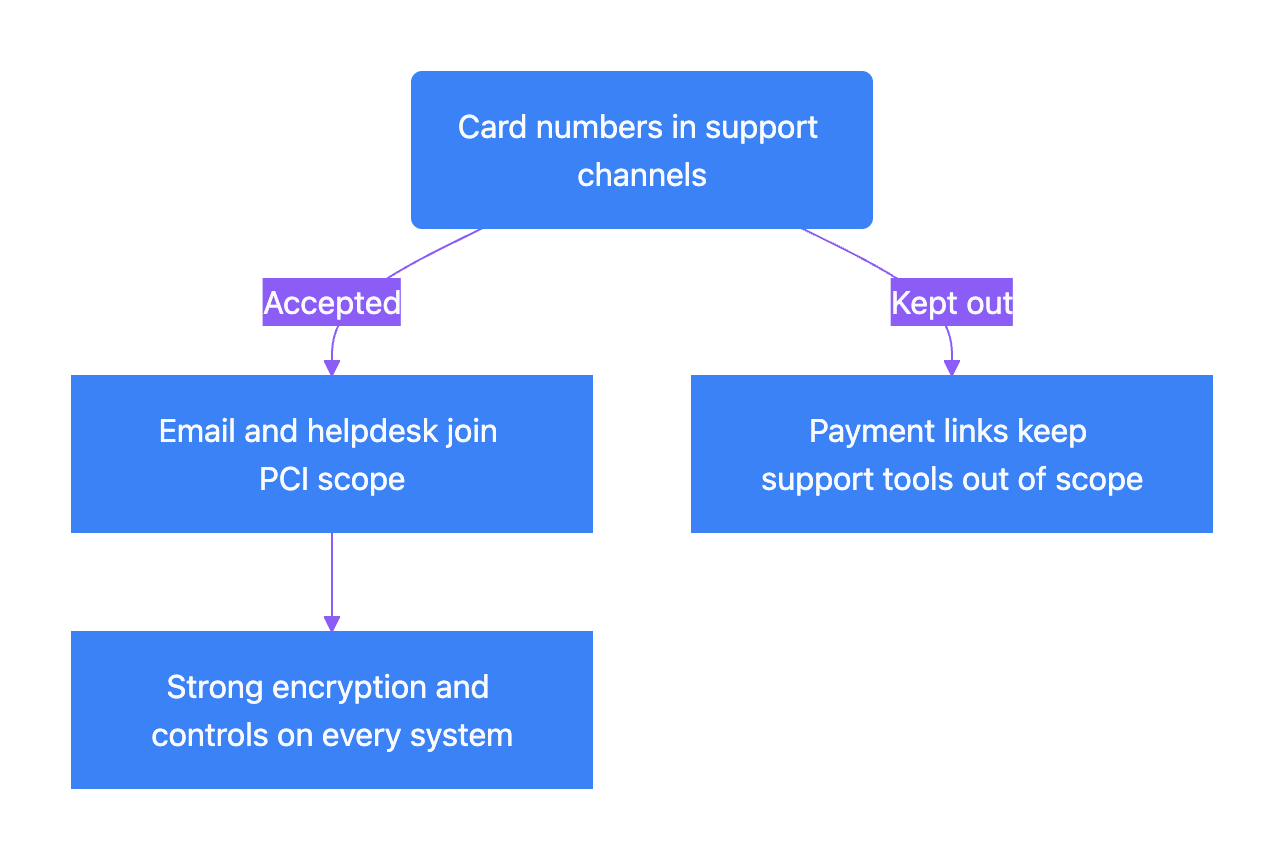
A second FAQ adds a nuance. PCI DSS does not ban receiving card data through these channels. But a channel that carries card numbers must meet the encryption rules. Your email servers and the systems around them then fall into PCI scope. For a small team, that is a large and expensive commitment. The practical answer is to keep card numbers out of support channels entirely.
How card numbers change your PCI scope:
What to do when a customer sends a card number in a ticket
You cannot stop every customer from typing their card number. You can control what happens next. The PCI Council covers this exact case in FAQ 1157. The merchant can bring the channel under PCI DSS or add controls so card data is not captured there. Data that arrives anyway should be removed right away or secured. Staff should not reply in the same channel with the data still in it.
For a small team, that becomes a short routine:
- Do not reply to the message as it is. A normal reply quotes the original text and sends the card number back out.
- Redact the card number in the ticket body and internal notes. Check attachments and any field where an agent may have copied it.
- Check whether the security code or expiry date came with it. The security code must never stay stored anywhere.
- Reply in a fresh message without the number. Thank the customer and send a secure payment link instead.
- Look for copies outside the helpdesk. Check email archives and forwarded threads, plus Slack messages and CRM notes.
- Record what happened. Requirement 12.10.7 expects you to find where the data came from and fix the process gap that let it in.
Response routine for a card number in a ticket:
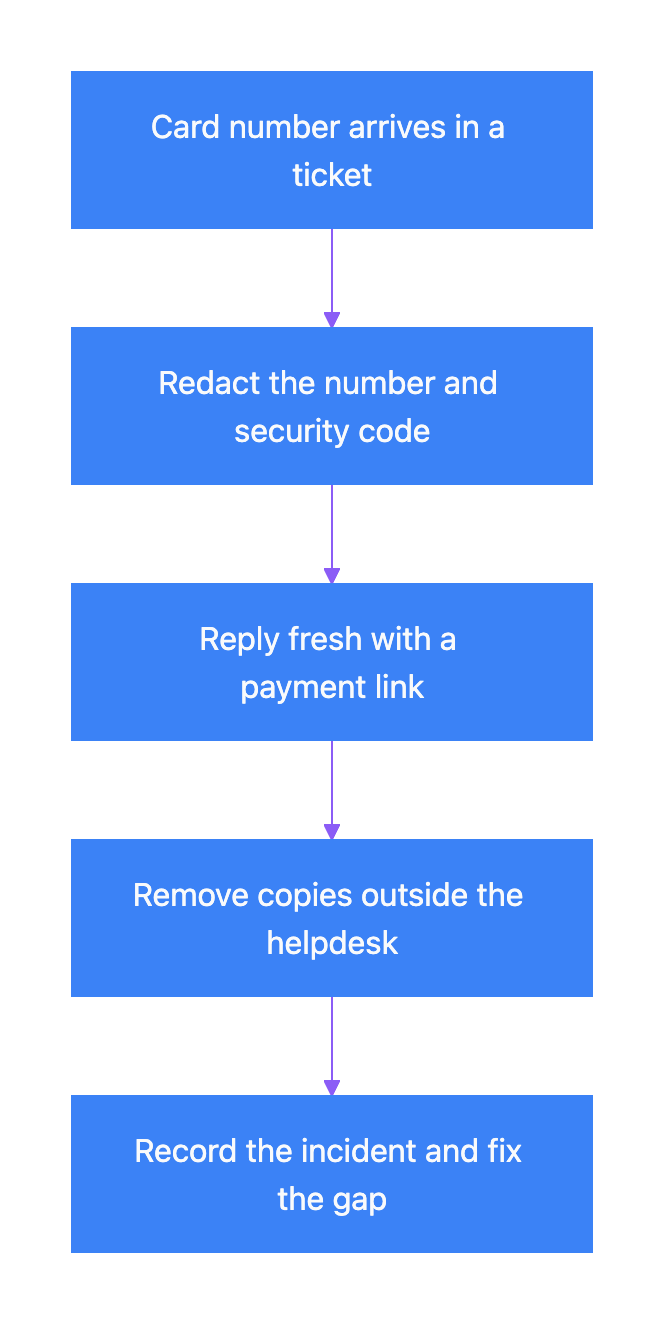
Say a customer of a small online shop emails about a declined card and pastes the card details. The agent removes the number and sends a fresh message with a link to the hosted checkout. The customer pays there, and the number never touches the shop’s systems again.
Keep a canned response ready for this moment. Our guide on creating canned responses for a small team shows how to build one. Something like this works well:
Thanks for sending this. To keep your card safe, we have removed the card details from our system. Please use this secure link to update your payment.
Do not scold the customer. They were trying to help.
Turn on card data redaction in your helpdesk
Manual cleanup depends on people noticing. Automatic card data redaction catches numbers even when agents are busy. Zendesk documents its version in detail, so it is a good example of what to look for.
In Zendesk, an admin turns it on in Admin Center under Account > Security > More settings. The checkbox is called Redact credit card numbers. Zendesk’s documentation describes how it works:
| Feature detail | How it works | What to watch |
|---|---|---|
| Detection | Luhn check plus known card prefixes, for numbers 12 to 19 digits long | It can miss some card numbers and flag some numbers that are not cards |
| Masking | Keeps the first six and the last four digits | This fits the PCI display limit for most cards |
| Timing | Applies when a ticket is created and to later comments and notes | Numbers already stored in old tickets are not redacted |
| Tagging | Adds a system tag to tickets with redacted numbers | Build a view to review these tickets each week |
| Plans | Suite Growth and higher, or Support Professional and higher | Not available on the entry plans |
Zendesk lists exceptions for MIME-encoded emails and for custom fields in suspended tickets. It also calls redaction an extra layer of security. Its help center says its credit card field is not PCI compliant. So redaction lowers your risk. It does not make your helpdesk PCI compliant.
Help Scout, Freshdesk and Gorgias users should check current documentation for a similar setting. Add card data redaction to your checklist when you compare tools. Our guide to choosing affordable support software covers the other basics.
Then clean up the past. Search your helpdesk for long strings of digits and for words like card number and CVV. Redact what you find. Old tickets often hold the real risk because nobody has looked at them in years.
Take payments without touching the card number
The best way to handle credit card numbers in support tickets is to never see them. Each method below moves card entry away from your agents and into a system built for it.
| Method | How it works | Effect on PCI scope | Good fit |
|---|---|---|---|
| Hosted payment link | The agent sends a link to a payment page run by the processor | Card data stays with the processor | Email and chat support |
| Self-service billing portal | The customer updates their card in their own account | Agents never see card data | Subscriptions and SaaS |
| Virtual terminal | The agent types the card into the processor’s web form | The agent’s device and process are in scope | Phone orders, used with care |
| Phone payment with keypad masking | The customer types digits on the keypad, and the tones are hidden from the agent and the recording | Keeps card data out of the call and the recording | Teams that must take card payments by phone |
Hosted links are the simplest fix for most small teams. Processors such as Stripe and Square offer payment links you can paste into a reply. The customer enters the card on the processor’s page, not yours. If a PCI-validated provider handles all your card-not-present payments, you may qualify for SAQ A. That is the shortest self-assessment questionnaire. Your acquiring bank or processor decides which questionnaire you file, so confirm with them.
Hosted payment link flow:
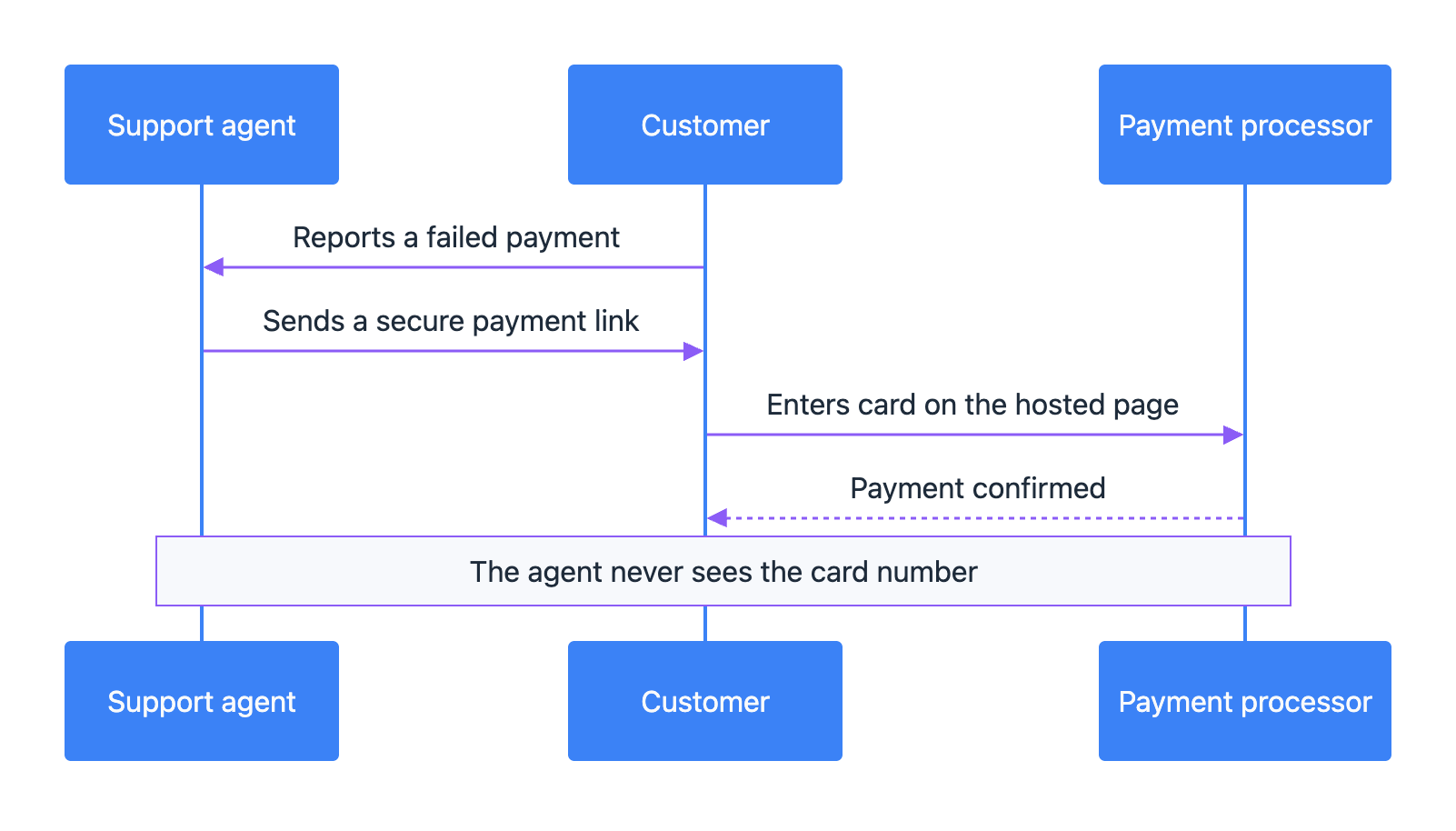
For subscriptions, a billing portal is even better. Customers fix a declined card themselves, which also cuts ticket volume. If a payment problem turns into a refund argument, see our guide on handling refund request disputes.
Phone support and call recordings
Phone support is where card data leaks quietly. A customer reads their card number aloud. The call recording now holds the number and maybe the security code too. Many teams keep recordings for months for quality review.
Under Requirement 3.3.1, the security code must not be stored after authorization. A recording of a spoken code is stored data. So is an agent’s sticky note with the digits on it.
The PCI Council’s guidance on telephone payments warns that call recording can store card data for no good reason. Its advice is plain. Do not store payment card data unless the business needs it. Prefer solutions that keep card data away from staff.
Some teams pause the recording while the customer reads the card number. That depends on the agent remembering every time, and people forget. Keypad entry with masking removes that human step.
For a small team, the easiest policy is to not take card numbers by phone at all. Send a payment link by SMS or email while the customer is still on the line. Stay on the call until the payment goes through. The customer still gets personal help, and the number never passes through your systems.
AI chatbots, transcripts and PCI compliance for helpdesk tools
AI support tools add new places for card numbers to hide. If a customer types a card number into an AI chat widget, the transcript keeps it. That copy may live in the vendor’s system, your helpdesk and your analytics tool. The text may also go to an AI model provider for processing.
Before launch, ask your AI support vendor whether it masks card numbers before it stores transcripts. Ask whether the AI model sees the masked text or the raw text. And ask whether you can delete a transcript when you need to.
Also watch your training data. Teams often export old tickets to build an AI knowledge base, and those exports can carry years of card numbers. Search them for card number patterns before upload. Our guide on preparing support documents for an AI agent covers the full export process.
Finally, tell the bot what to say. The assistant must never ask for card details. If a customer offers them, the bot should point to the secure payment page and stop there.
Write a one-page PCI DSS policy for your support team
Rules only work if your team knows them. One page is enough for most small teams.
| Policy item | What to write | Why it matters |
|---|---|---|
| Never ask | Agents never request a full card number or security code in any channel | Stops the problem at the source |
| Redact on sight | Remove card numbers from tickets, notes and attachments right away | Limits how long the data is exposed |
| Safe reply | Reply in a fresh message and send a payment link | Avoids quoting the number back |
| Phone rule | Send a payment link during the call instead of taking digits | Keeps recordings clean |
| Escalation | Tell the owner or security lead when a number is found | Meets the incident response requirement |
| Monthly review | Check redaction tags and search for card patterns every month | Catches what automation missed |
Add the policy to your training for new hires. Our guide on onboarding a new support hire explains how to fit it into the first week. For practice, the Data Defender game has players sort sensitive data such as client credit cards into the right zones.
Card data rules sit next to other compliance rules your team may follow. If you also handle health data, see our HIPAA basics for customer communication. For EU customers, our GDPR guide explains why you should collect as little personal data as you can. If a customer asks about your security program, start with our SOC 2 explainer.
Common mistakes to avoid
Most card data problems in support come from habits, not hackers.
| Mistake | Why it is a problem | Better approach |
|---|---|---|
| Replying to an email that holds a card number | The quoted text sends the number out again | Start a fresh reply without the data |
| Asking for the security code to confirm identity | The security code must never be stored | Confirm identity with the last four digits and account details |
| Forwarding the ticket to finance by email | It creates another unprotected copy | Share the ticket link, not the content |
| Turning on redaction and ignoring old tickets | Past data stays in the system | Search and clean the archive once |
| Ignoring photos of cards | Text redaction does not read images | Delete images that show a card number and ask for a payment link instead |
Final thoughts
PCI DSS customer support rules come down to one idea. Card numbers do not belong in support tickets, messages or call recordings. Requirement 4.2.2 bans sending unprotected card numbers through messaging tools. Requirement 3.3.1 bans storing the security code. Requirement 12.10.7 says to treat an unexpected card number as an incident.
You do not need a big budget to get this right. Turn on redaction in your helpdesk and clean old tickets once. Keep a canned reply with a secure payment link. Move phone payments to links or masked keypad entry. Then write the rules on one page and train every new hire.
None of this makes your business PCI compliant on its own. Your acquirer and your self-assessment decide that. But it closes a common way card data leaks out of small support teams.
Frequently Asked Questions
Is it a PCI DSS violation if a customer emails us their card number?
PCI DSS does not ban receiving card data by email or chat. But a channel that carries card numbers must meet the encryption rules, and the systems behind it fall into PCI scope. The PCI Council says data that arrives through an unintended channel should be removed right away or secured. The real problem is leaving the number in your helpdesk or replying with it still in the thread.
Can we keep the last four digits of a card in a ticket?
Yes. Requirement 3.4.1 lets screens show at most the BIN and the last four digits. The last four digits alone cannot be used to make a payment. That is why many teams use them with account details to confirm which card a customer means. Never store the security code, though.
Does turning on helpdesk redaction make us PCI compliant?
No. Redaction lowers the risk that card numbers sit in your tickets. Zendesk calls its redaction an extra layer of security and says its credit card field is not PCI compliant. Your compliance depends on how you accept payments and on the self-assessment questionnaire your acquirer asks for.
What should our AI chatbot do if a customer types a card number?
It should never ask for card details. If a customer offers them, it should point to your secure payment page. Before launch, check whether the vendor masks card numbers before it stores transcripts or sends text to the AI model. Also confirm that you can delete a transcript when you need to.
Can we still take card payments over the phone?
You can, but phone systems and recordings that hold card data are in PCI scope. The security code must not be stored after authorization, and that includes call recordings. The safest option for a small team is to send a payment link while the customer is on the line. Keypad entry with masking is the next best choice for teams that must take card details by phone.
Which self-assessment questionnaire applies if we only use payment links?
A small merchant that outsources all card-not-present payments to a PCI-validated provider may qualify for SAQ A. It is the shortest questionnaire. Your acquiring bank or payment processor decides which one you file. Confirm with them before you assume SAQ A.
How often should we search old tickets for card numbers?
Clean the whole archive once when you turn on redaction. Zendesk’s redaction, for example, does not touch numbers already stored. After that, a monthly check of redaction tags and a search for card number patterns works for most small teams. Treat every number you find as an incident under Requirement 12.10.7 and find out how it got there.